If you’re building an API on Cloudflare Workers and need authentication, Better Auth is probably the best choice today. It works like Lego: you declare the plugins you want (email/password, OAuth, 2FA, admin) and it generates all the routes, callbacks and even the database schema.
The combo with Cloudflare is particularly good because:
- D1 (SQLite at the edge) as the main database
- KV as session cache (800ms → 20ms, seriously)
- R2 for per-user avatar uploads
- Free geolocation on every request
If you want to skip straight to the code, there’s a ready-made template: github.com/gabszs/workers-template
Table of contents
Open Table of contents
- The problem we’re solving
- Stack
- Initial setup
- The minimal configuration
- The complete configuration (with the interesting plugins)
- Plugins worth using
- OAuth: Google and GitHub
- The generated schema
- Setting up the Hono handler
- Protecting routes
- Generating the frontend with AI
- Useful scripts
- Development workflow
- Deploy
- Why this stack?
- Links
The problem we’re solving
Authentication is one of those problems that seems simple until you start implementing it. You think “oh, it’s just a login with email and password”, and suddenly you’re debugging OAuth flows, writing migrations for refresh tokens, and wondering why the cookie isn’t being set in Safari.
Better Auth exists because someone decided this suffering was optional. You configure a JavaScript object with what you want, and it handles the rest: routes, handlers, validations, database schema.
The interesting part is that it works through plugins. Want admin? Add admin(). Want phone login? Add phoneNumber(). Each plugin can add database fields and API routes automatically.
Stack
| Component | Purpose |
|---|---|
| Hono | Web framework. Fast, lightweight, runs anywhere |
| Better Auth | Auth framework. Modular, type-safe |
| Drizzle | ORM. Generates SQL queries without black magic |
| D1 | Cloudflare’s SQLite. Serverless, at the edge |
| better-auth-cloudflare | Glues everything together with CF bindings |
Initial setup
First, the dependencies:
pnpm create hono  # select cloudflare-workers template
pnpm add better-auth better-auth-cloudflare  # auth framework + CF bindings
pnpm add drizzle-orm  # type-safe ORM
pnpm add -D drizzle-kit  # migration CLI
pnpm add resend  # email service
Environment variables
Create a .dev.vars at the root:
BETTER_AUTH_SECRET=a-long-random-string-here

# OAuth (optional)
GOOGLE_CLIENT_ID=
GOOGLE_CLIENT_SECRET=
GITHUB_CLIENT_ID=
GITHUB_CLIENT_SECRET=

# Email
RESEND_API_KEY=

# CORS
CORS_ORIGIN=http://localhost:3000,http://localhost:3001
The BETTER_AUTH_SECRET is used to sign tokens and cookies. Never commit this to the repo.
.dev.varsoverrideswrangler.jsoncvars in local development. Use it for secrets you don’t want in version control.
wrangler.jsonc
This is where you declare your Cloudflare bindings (D1, KV, R2) and production environment variables:
{
  "name": "my-auth-api",
  "main": "src/index.ts",
  "compatibility_date": "2025-01-01",
  "compatibility_flags": ["nodejs_compat"],  // required for some dependencies
  "vars": {
    // production env vars (non-secrets)
    "CORS_ORIGIN": "https://myapp.com,https://www.myapp.com",
    "BETTER_AUTH_URL": "https://api.myapp.com/api/auth"
  },
  "kv_namespaces": [
    {
      "binding": "KV",  // accessible as env.KV in code
      "id": "your-kv-namespace-id",
      "preview_id": "your-kv-namespace-id"
    }
  ],
  "r2_buckets": [
    {
      "binding": "R2",  // accessible as env.R2 in code
      "bucket_name": "my-auth-uploads",
      "preview_bucket_name": "my-auth-uploads"
    }
  ],
  "d1_databases": [
    {
      "binding": "D1",  // accessible as env.D1 in code
      "database_id": "your-d1-database-id",
      "database_name": "my-auth-db",
      // IMPORTANT: tells wrangler where to find migration files
      "migrations_dir": "src/db/migrations",
      "preview_database_id": "your-d1-database-id"
    }
  ]
}
To create the bindings on Cloudflare:
wrangler d1 create my-auth-db        # creates D1, outputs database_id
wrangler kv namespace create KV       # creates KV, outputs namespace id
wrangler r2 bucket create my-auth-uploads  # creates R2 bucket
Cloudflare types
Run pnpm wrangler types to generate binding types. Your tsconfig.json needs to include:
{
  "compilerOptions": {
    "types": ["./worker-configuration.d.ts"]
  }
}
Drizzle config
Drizzle needs to know where the database is. In dev, Wrangler creates a .sqlite file inside .wrangler/. In prod, it uses D1 via HTTP.
// drizzle.config.ts
import fs from "node:fs";
import path from "node:path";
import { defineConfig } from "drizzle-kit";

// Finds the local .sqlite file created by wrangler
function getLocalD1DB() {
  try {
    const basePath = path.resolve(".wrangler");
    const dbFile = fs
      .readdirSync(basePath, { encoding: "utf-8", recursive: true })
      .find((f) => f.endsWith(".sqlite"));

    if (!dbFile) {
      throw new Error(`.sqlite file not found in ${basePath}`);
    }

    return path.resolve(basePath, dbFile);
  } catch (err) {
    console.log(`Error: ${err}`);
  }
}

export default defineConfig({
  dialect: "sqlite",
  schema: "./src/db/models.ts",
  out: "./src/db/migrations",
  // prod: connects via D1 HTTP API | dev: uses local .sqlite file
  ...(process.env.ALCHEMY_STAGE === "prod"
    ? {
        driver: "d1-http",
        dbCredentials: {
          accountId: process.env.CLOUDFLARE_D1_ACCOUNT_ID,
          databaseId: process.env.CLOUDFLARE_DATABASE_ID,
          token: process.env.CLOUDFLARE_D1_API_TOKEN,
        },
      }
    : {
        dbCredentials: {
          url: getLocalD1DB(),
        },
      }),
});
The minimal configuration
If you just want email/password working, the setup is straightforward:
// src/lib/auth.ts
import { betterAuth } from "better-auth";
import { drizzleAdapter } from "better-auth/adapters/drizzle";
import { drizzle } from "drizzle-orm/d1";
import { models } from "../db/models";

function createAuth(env: CloudflareBindings) {
  // Initialize Drizzle with D1 binding
  const db = drizzle(env.D1, { schema: models });

  return betterAuth({
    // Connect Better Auth to Drizzle/D1
    database: drizzleAdapter(db, {
      provider: "sqlite",
      usePlural: true,  // tables: users, sessions (not user, session)
      schema: models,
    }),
    emailAndPassword: { enabled: true },  // enables /sign-in, /sign-up routes
    trustedOrigins: env.CORS_ORIGIN?.split(",") || ["http://localhost:3000"],
    secret: env.BETTER_AUTH_SECRET,  // used to sign tokens/cookies
    basePath: "/api/auth",
  });
}

export function getAuthInstance(env: CloudflareBindings) {
  return createAuth(env);
}

export { createAuth };
Done. This already gives you /api/auth/sign-in, /api/auth/sign-up, /api/auth/sign-out, and session validation.
The complete configuration (with the interesting plugins)
This is where things get fun. The better-auth-cloudflare package adds native integrations with D1, KV and R2. Combined with the official plugins, you get a pretty robust auth system.
// src/lib/auth.ts
import { betterAuth } from "better-auth";
import { drizzleAdapter } from "better-auth/adapters/drizzle";
import { admin, emailOTP, openAPI, phoneNumber } from "better-auth/plugins";
import { withCloudflare } from "better-auth-cloudflare";
import { drizzle } from "drizzle-orm/d1";
import { Resend } from "resend";
import { models } from "../db/models";

function createAuth(env: CloudflareBindings, cf?: IncomingRequestCfProperties) {
  const db = drizzle(env.D1, { schema: models });

  return betterAuth({
    // withCloudflare spreads KV cache, R2 uploads, and geolocation config
    ...withCloudflare(
      {
        autoDetectIpAddress: true,  // extracts IP from CF-Connecting-IP header
        geolocationTracking: true,  // stores location data on each session
        cf: cf || {},  // CF request properties (contains geo data)
        d1: {
          db,
          options: {
            usePlural: true,
            debugLogs: true,
          },
        },
        kv: env.KV,  // session cache: reduces auth latency from 800ms to 20ms
        r2: {
          bucket: env.R2,  // per-user file uploads
          maxFileSize: 2 * 1024 * 1024,  // 2MB limit
          allowedTypes: [".jpg", ".jpeg", ".png", ".gif"],
        },
      },
      {
        emailAndPassword: {
          enabled: true,
          requireEmailVerification: true,
          // called when user requests password reset
          sendResetPassword: async ({ user, url }) => {
            const resend = new Resend(env.RESEND_API_KEY);
            await resend.emails.send({
              from: "App <[email protected]>",
              to: user.email,
              subject: "Reset your password",
              html: `<p>Click <a href="${url}">here</a> to reset your password.</p>`,
            });
          },
        },
        emailVerification: {
          // called on sign-up to verify email
          sendVerificationEmail: async ({ user, url }) => {
            const resend = new Resend(env.RESEND_API_KEY);
            await resend.emails.send({
              from: "App <[email protected]>",
              to: user.email,
              subject: "Verify your email",
              html: `<p>Click <a href="${url}">here</a> to verify your email.</p>`,
            });
          },
          sendOnSignUp: true,  // auto-send verification on registration
          autoSignInAfterVerification: true,
        },
        plugins: [
          openAPI(),  // generates /api/auth/reference docs
          admin(),  // user management: ban, roles, impersonation
          phoneNumber(),  // SMS/WhatsApp login
          emailOTP({
            // sends 6-digit code instead of magic link
            async sendVerificationOTP({ email, otp, type }) {
              if (type === "sign-in") {
                const resend = new Resend(env.RESEND_API_KEY);
                await resend.emails.send({
                  from: "App <[email protected]>",
                  to: email,
                  subject: "Your verification code",
                  html: `<p>Your code: <strong>${otp}</strong></p>`,
                });
              }
            },
          }),
        ],
        // OAuth providers - credentials from env vars
        socialProviders: {
          google: {
            clientId: env.GOOGLE_CLIENT_ID || "",
            clientSecret: env.GOOGLE_CLIENT_SECRET || "",
          },
          github: {
            clientId: env.GITHUB_CLIENT_ID || "",
            clientSecret: env.GITHUB_CLIENT_SECRET || "",
          },
        },
      }
    ),
    database: drizzleAdapter(db, {
      provider: "sqlite",
      usePlural: true,
      schema: models,
    }),
    trustedOrigins: env.CORS_ORIGIN?.split(",") || ["http://localhost:3000"],
    secret: env.BETTER_AUTH_SECRET,
    basePath: "/api/auth",
    telemetry: { enabled: false },
  });
}

export function getAuthInstance(env: CloudflareBindings) {
  return createAuth(env);
}

export { createAuth };
Plugins worth using
openAPI()
Generates OpenAPI documentation for all auth routes. Access /api/auth/reference and you get an interactive UI to test everything.
There’s a live example here: template-hono-workers-api.gabszs.workers.dev/api/auth/reference
admin()
Adds user management: listing, banning, session impersonation, role management. Added fields:
users.roleusers.bannedusers.banReasonusers.banExpiressessions.impersonatedBy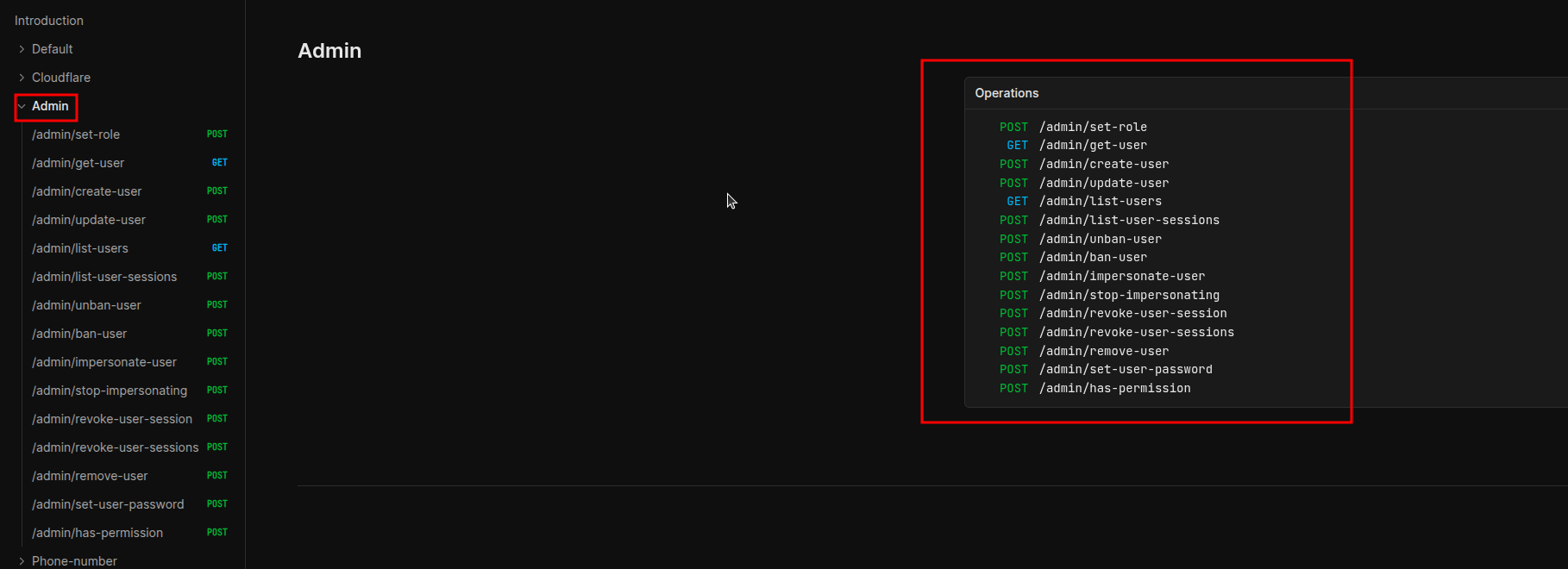 Admin plugin endpoints: listUsers, banUser, unbanUser, setRole, impersonateUser and stopImpersonating
phoneNumber()
Adds users.phoneNumber and users.phoneNumberVerified at users table. Enables login via SMS/WhatsApp.
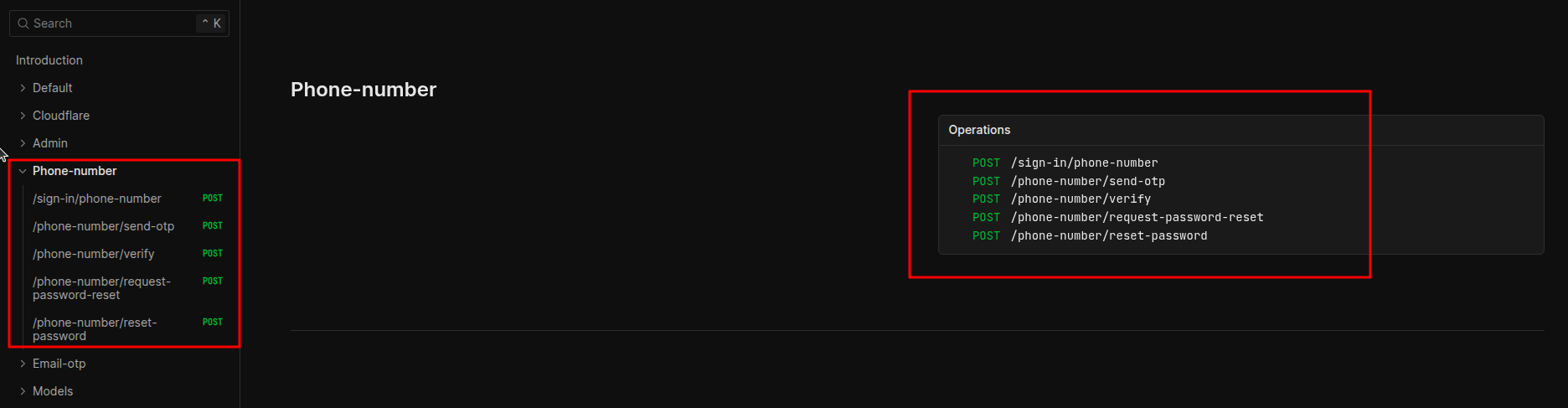 Endpoints for sending and verifying codes via SMS/WhatsApp
emailOTP()
Alternative to magic link. User receives a 6-digit code by email instead of a link.
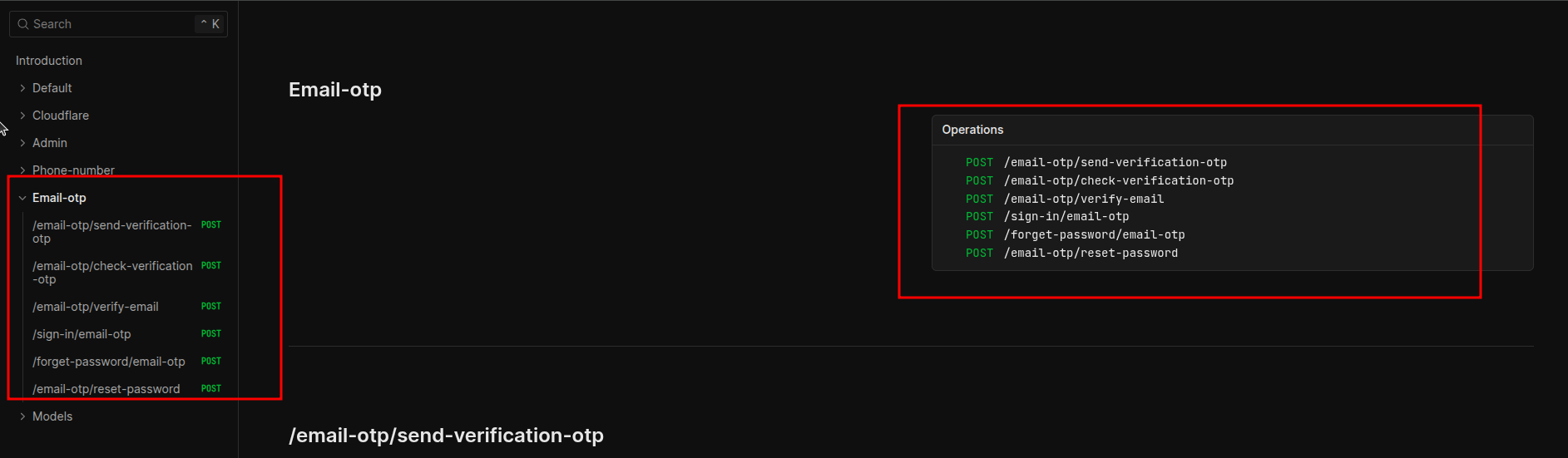 Endpoints for sending and verifying 6-digit codes via email
withCloudflare() - this is the important one
The better-auth-cloudflare package is what makes the Cloudflare integration worthwhile.
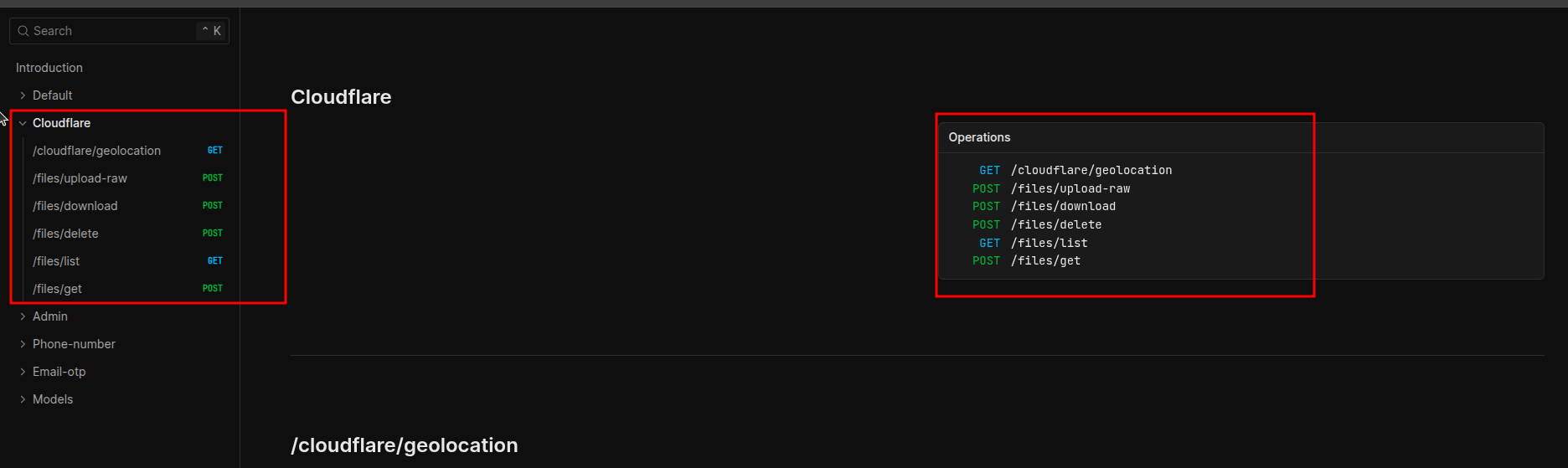 Endpoints for KV, R2 and automatic geolocation integration
KV as session cache:
This is the most impactful feature. Verifying sessions on D1 during cold start takes ~800ms-1s. With KV, it drops to ~12-20ms. The difference is massive in applications with lots of authenticated requests.
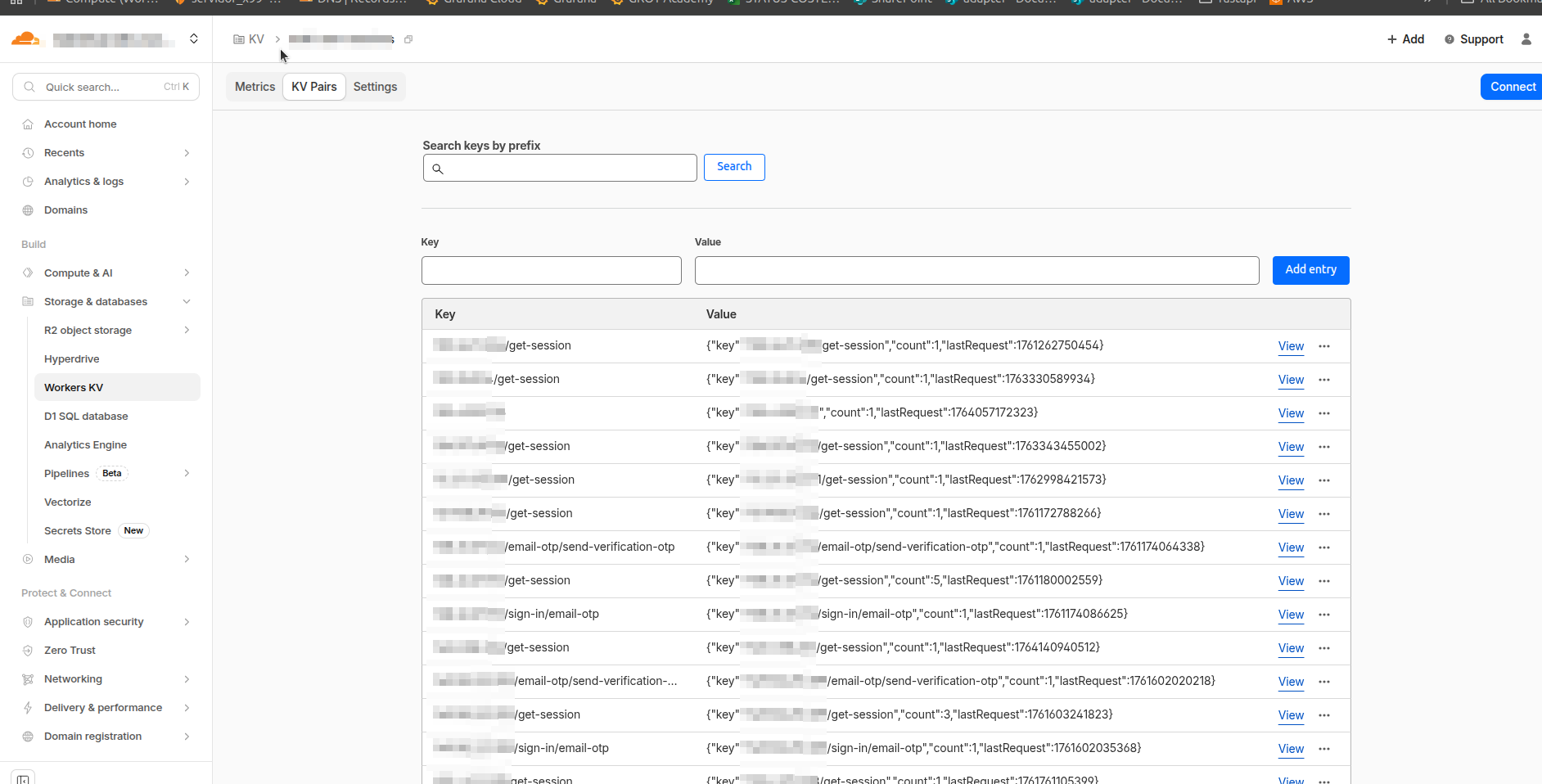 Cloudflare KV dashboard showing cached user sessions
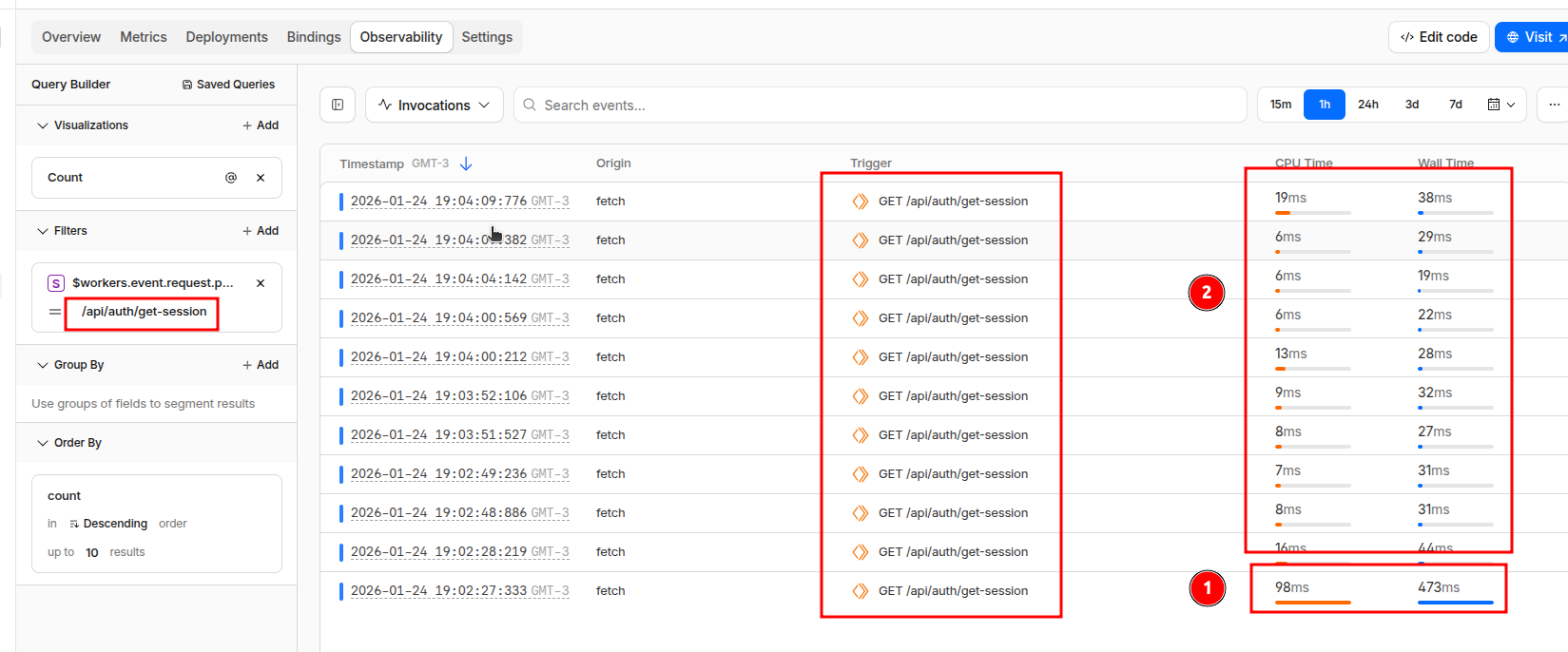 Response time comparison: ~12-20ms with KV cache vs ~800ms-1s without cache
R2 for uploads:
Creates automatic routes for per-user file uploads. You configure max file size and allowed types, and each file gets associated with the logged-in user.
Geolocation on sessions:
Automatically adds:
timezonecitycountryregionregionCodecololatitudelongitude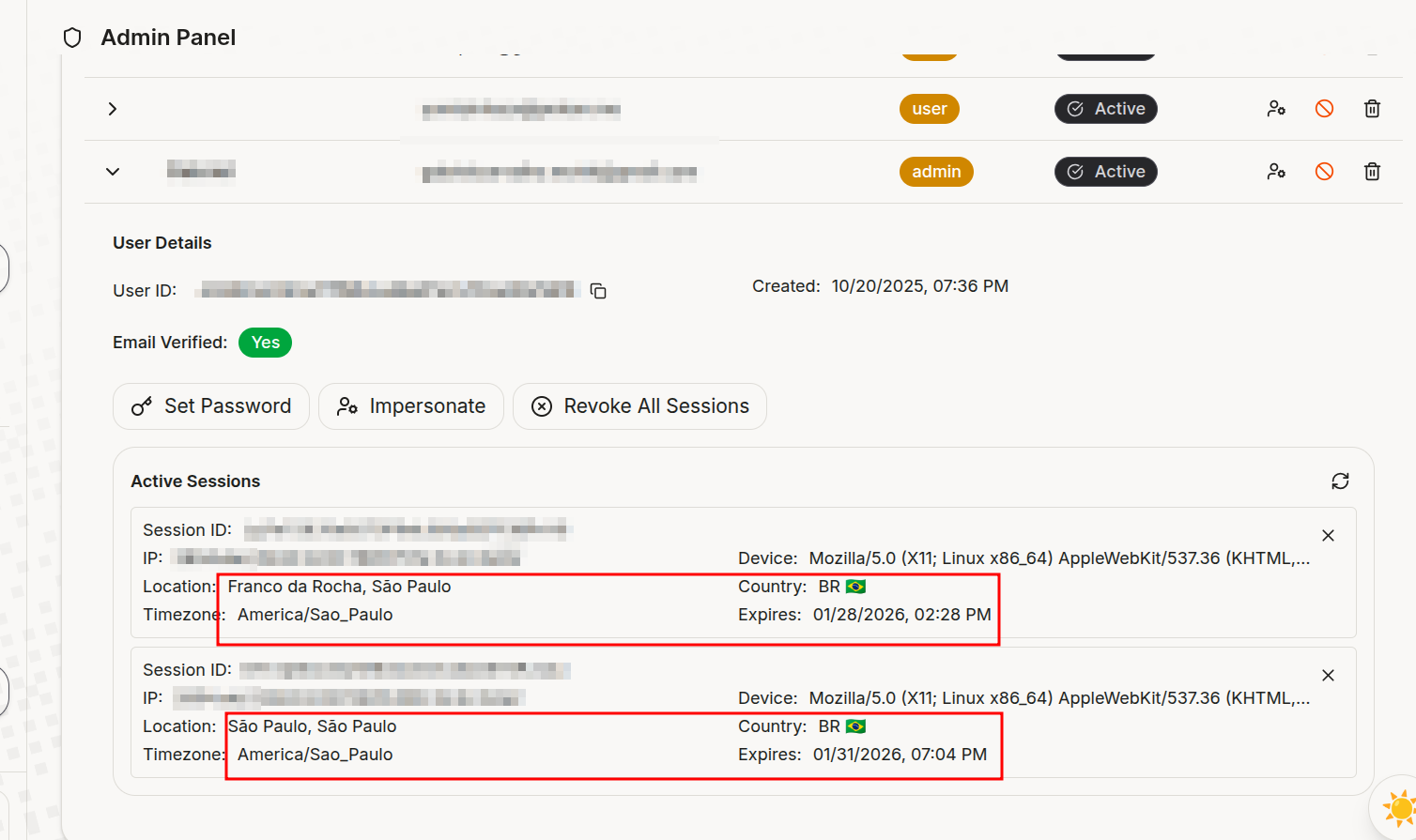 Session data with automatic geolocation: timezone, city, country, region and coordinates
You can see where your users are logging in from without doing anything.
OAuth: Google and GitHub
Configuring OAuth is just passing the credentials:
socialProviders: {
  google: {
    clientId: env.GOOGLE_CLIENT_ID || "",
    clientSecret: env.GOOGLE_CLIENT_SECRET || "",
  },
  github: {
    clientId: env.GITHUB_CLIENT_ID || "",
    clientSecret: env.GITHUB_CLIENT_SECRET || "",
  },
},
To get the credentials:
-
Google: console.cloud.google.com → APIs & Services → Credentials → OAuth 2.0 Client ID
- Redirect URI:
https://your-domain.com/api/auth/callback/google
- Redirect URI:
-
GitHub: github.com/settings/developers → OAuth Apps → New
- Callback URL:
https://your-domain.com/api/auth/callback/github
- Callback URL:
Better Auth generates the routes automatically:
/api/auth/sign-in/google/api/auth/sign-in/github/api/auth/callback/google/api/auth/callback/github
The generated schema
The Better Auth CLI generates the Drizzle schema automatically. After running pnpm auth:generate, you’ll have something like this:
// src/db/authModels.ts
import { integer, sqliteTable, text } from "drizzle-orm/sqlite-core";

export const users = sqliteTable("users", {
  id: text("id").primaryKey(),
  name: text("name").notNull(),
  email: text("email").notNull().unique(),
  emailVerified: integer("email_verified", { mode: "boolean" }).default(false).notNull(),
  image: text("image"),
  createdAt: integer("created_at", { mode: "timestamp_ms" }).notNull(),
  updatedAt: integer("updated_at", { mode: "timestamp_ms" }).notNull(),
  // admin()
  role: text("role"),
  banned: integer("banned", { mode: "boolean" }).default(false),
  banReason: text("ban_reason"),
  banExpires: integer("ban_expires", { mode: "timestamp_ms" }),
  // phoneNumber()
  phoneNumber: text("phone_number").unique(),
  phoneNumberVerified: integer("phone_number_verified", { mode: "boolean" }),
});

export const sessions = sqliteTable("sessions", {
  id: text("id").primaryKey(),
  expiresAt: integer("expires_at", { mode: "timestamp_ms" }).notNull(),
  token: text("token").notNull().unique(),
  ipAddress: text("ip_address"),
  userAgent: text("user_agent"),
  userId: text("user_id").notNull().references(() => users.id, { onDelete: "cascade" }),
  // withCloudflare geolocation
  timezone: text("timezone"),
  city: text("city"),
  country: text("country"),
  region: text("region"),
  regionCode: text("region_code"),
  colo: text("colo"),
  latitude: text("latitude"),
  longitude: text("longitude"),
  // admin()
  impersonatedBy: text("impersonated_by"),
});
Setting up the Hono handler
// src/index.ts
import { Hono } from "hono";
import { cors } from "hono/cors";
import { createAuth, getAuthInstance } from "./lib/auth";

type AppBindings = {
  Bindings: CloudflareBindings;
  Variables: {
    userId: string;
    auth: ReturnType<typeof createAuth>;
  };
};

const app = new Hono<AppBindings>();

// CORS with credentials for cookie-based auth
app.use(
  "/*",
  cors({
    origin: (origin, c) => c.env.CORS_ORIGIN?.split(",") || ["http://localhost:3000"],
    credentials: true,  // required for cookies to work cross-origin
  })
);

// Inject auth instance with CF request metadata (for geolocation)
app.use("*", async (c, next) => {
  if (c.req.path.startsWith("/api/auth")) {
    const auth = createAuth(c.env, (c.req.raw as any).cf || {});
    c.set("auth", auth);
  }
  await next();
});

// Let Better Auth handle all /api/auth/* routes
app.all("/api/auth/*", async (c) => {
  const auth = c.get("auth");
  return auth.handler(c.req.raw);
});

export default app;
Protecting routes
// src/lib/middleware.ts
import { createMiddleware } from "hono/factory";
import { getAuthInstance } from "./auth";

export const authMiddleware = createMiddleware(async (c, next) => {
  const auth = getAuthInstance(c.env);
  // Validates session from cookies/headers (uses KV cache if configured)
  const session = await auth.api.getSession({ headers: c.req.raw.headers });

  if (!session?.user) {
    return c.text("Unauthorized", 401);
  }

  c.set("userId", session.user.id);  // makes userId available in handlers
  await next();
});
Usage:
import { Hono } from "hono";
import { authMiddleware } from "./lib/middleware";

const app = new Hono();

app.get("/health", (c) => c.json({ status: "ok" }));  // public

app.use("/v1/*", authMiddleware);  // protect all /v1/* routes

app.get("/v1/me", (c) => {
  const userId = c.get("userId");  // set by authMiddleware
  return c.json({ userId });
});
Generating the frontend with AI
The openAPI() plugin generates a complete specification at /api/auth/openapi.json. You can feed this to an AI and ask it to generate frontend hooks:
Generate authentication hooks for React based on this OpenAPI spec:

[paste the JSON here]

Requirements:
- Native fetch with credentials: 'include'
- TypeScript
- Hooks for: sign-in, sign-up, sign-out, get-session
- Error handling
It works surprisingly well.
Useful scripts
{
  "scripts": {
    "dev": "wrangler types && wrangler dev",
    "deploy": "wrangler types && wrangler deploy",
    "cf-typegen": "wrangler types",
    "auth:generate": "ALCHEMY_STAGE=dev npx @better-auth/cli@latest generate --config src/lib/auth.ts --output src/db/authModels.ts -y",
    "db:generate": "drizzle-kit generate",
    "db:migrate:dev": "wrangler d1 migrations apply your-db --local",
    "db:migrate:prod": "wrangler d1 migrations apply your-db --remote",
    "studio": "drizzle-kit studio"
  }
}
Development workflow
Initial setup
pnpm cf-typegen      # 1. generate CF bindings types
pnpm auth:generate   # 2. generate Drizzle schema from plugins
pnpm db:generate     # 3. create SQL migration files
pnpm db:migrate:dev  # 4. apply migrations to local D1
pnpm dev             # 5. start dev server
Adding a plugin
# 1. Add the plugin in src/lib/auth.ts

# 2. Regenerate the schema
pnpm auth:generate

# 3. Generate new migration
pnpm db:generate

# 4. Apply locally
pnpm db:migrate:dev

# 5. In prod
pnpm db:migrate:prod
The
auth:generatecommand needs to run every time you modify plugins. It reads your config and generates the corresponding models.
Deploy
pnpm db:migrate:prod  # migrations first
pnpm deploy           # then the worker
Why this stack?
- Minimal latency: everything runs at the edge, close to the user
- Zero cost to start: D1 has a generous free tier
- End-to-end type safety: from the database to the frontend
- Modular: you only add what you need
- KV as cache: reduces session verification from 1s to 20ms
- Free geo: Cloudflare already gives you this on every request
Links
If you liked this post, have any feedback or questions, you can reach me on WhatsApp or email.